bonnie++

Official Website: bonnie++

Linux底下專門設計來量測硬碟的讀寫效能程式。

sudo apt-get install bonnie++

在預設狀況下bonnie++會自動使用兩倍的記憶體大小的buffer來做測試。

一個範例執行畫面如下:
xinyu$ bonnie++ -d /media/TestDrive/
Writing a byte at a time...done
Writing intelligently...done
Rewriting...done
Reading a byte at a time...done
Reading intelligently...done
start 'em...done...done...done...done...done...
Create files in sequential order...done.
Stat files in sequential order...done.
Delete files in sequential order...done.
Create files in random order...done.
Stat files in random order...done.
Delete files in random order...done.
Version 1.96 ------Sequential Output------ --Sequential Input- --Random-
Concurrency 1 -Per Chr- --Block-- -Rewrite- -Per Chr- --Block-- --Seeks--
Machine Size K/sec %CP K/sec %CP K/sec %CP K/sec %CP K/sec %CP /sec %CP
xinyu 733 98 82251 17 49522 17 2501 99 161162 26 10783 263
Latency 16574us 337ms 506ms 9673us 6121us 4842us
Version 1.96 ------Sequential Create------ --------Random Create--------
xinyu -Create-- --Read--- -Delete-- -Create-- --Read--- -Delete--
files /sec %CP /sec %CP /sec %CP /sec %CP /sec %CP /sec %CP
16 +++++ +++ +++++ +++ +++++ +++ +++++ +++ +++++ +++ +++++ +++
Latency 224us 1764us 510us 217us 8us 36us
1.96,1.96,
xinyu,1,1295148264,6544M,,733,98,82251,17,49522,17,2501,99,161162,26,10783,263,16,,,,,+++++,+++,+++++,+++,+++++,+++,+++++,+++,+++++,+++,+++++,+++,16574us,337ms,506ms,9673us,6121us,4842us,224us,1764us,510us,217us,8us,36us

pyRenamer

懶的自己寫script來批次更改檔名的話就用這個吧!


sudo apt-get install pyrenamer

OpenGL Environment in Linux

Official Website:http://www.opengl.org/

自從顯示問題暫時獲得解決之後,我終於可以在Linux底下建立OpenGL的環境,透過安裝以下的套件就可以開始使用OpenGL撰寫程式:

sudo apt-get install build-essential libgl1-mesa-dev libglu1-mesa-dev libglut3-dev

一個簡易的範例如下:

#include <GL/glut.h>

void init();
void display();

int main(int argc, char* argv[])
{
    glutInit(&argc, argv);
    glutInitDisplayMode(GLUT_RGB | GLUT_SINGLE);
    glutInitWindowPosition(0, 0);
    glutInitWindowSize(300, 300);
    
    glutCreateWindow("OpenGL 3D View");
    
    init();
    glutDisplayFunc(display);
    
    glutMainLoop();
    return 0;
}

void init()
{
    glClearColor(0.0, 0.0, 0.0, 0.0);
    glMatrixMode(GL_PROJECTION);
    glOrtho(-5, 5, -5, 5, 5, 15);
    glMatrixMode(GL_MODELVIEW);
    gluLookAt(0, 0, 10, 0, 0, 0, 0, 1, 0);
}

void display()
{
    glClear(GL_COLOR_BUFFER_BIT);
    
    glColor3f(0.5, 1, 0.2);
    glutWireTeapot(3);
    
    glFlush();
}


編譯方式:
gcc -lGL -lGLU -lglut -o example example.c
輸出畫面:


Reference:Howto Install OpenGL Development Environment

Web Warrior

Official Website: http://www.cbc.ca/documentaries/doczone/2008/webwarriors/

這不是一部介紹入侵手法的紀錄片(畢竟裡面所談的手法都已有一段歷史了),這是一部以案例的方式來說明我們慣以賴用的網際網路背後所存在的安全危機(Cybercrime)。影片中有提到Michael Calce使用DDoS來攻擊各大商業入口網站,談到病毒不免也會提到在2003年轟動一時的Blaster,以及概略的簡述Wireless Security的問題。影片中有一段地方滿奇怪的,Donnie帶著那個Cantenna(用品客做的無線訊號強波器)做所謂的Wardriving時,頂端作為訊號的蒐集端居然用鋁箔紙包覆著,這樣訊號不就被反射掉嗎?

完整的影面可以從下面的連結觀賞(如果你住在加拿大可以直接從官方頁面裡觀看)。

http://vimeo.com/3322013

shutter (advanced screenshot)

Official Website:http://shutter-project.org/

在寫blog或者報告時常常會需要攝取桌面畫面,但是預設狀況下PrintScreen是將整個畫面給抓下來,如果要細部的內容則是開啟GIMP來做後製的修圖,這整個過程如果是要處理很多張圖片就顯得很沒效率。shutter是一隻由Mario Kemper以Perl所撰寫的抓圖程式,提供了普遍抓圖程式的選成區域抓圖功能,讓整個抓圖的過程更有效率點。安裝方式如下:

sudo apt-get install shutter

WinFF (GUI FFmpeg)

Official Website: http://winff.org/


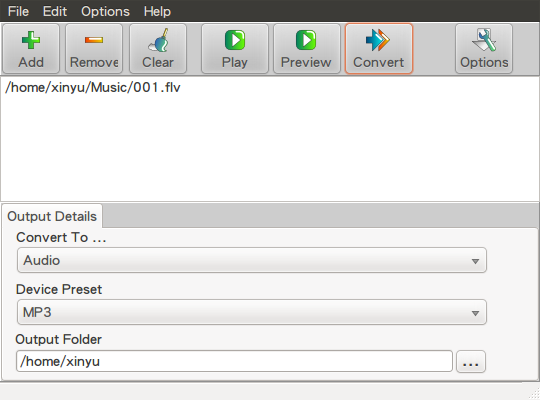
在Linux底下如果你實在懶得在terminal底下輸入ffmpeg指令來做轉檔的話,可以使用WinFF來加速轉檔的動作。安裝方式如下:

取得key
wget --quiet --output-document=- "http://winff.org/ubuntu/AAFE086A.gpg" | sudo apt-key add -
加入來源到sources.list.d
echo "deb http://winff.org/ubuntu lucid universe" | sudo tee /etc/apt/sources.list.d/winff.list
安裝WinFF
sudo apt-get update && sudo apt-get install winff
安裝完後你會在Applicaiton->Sound & Video找到WinFF。

Cairo-Dock, Docky, Avant-window-navigator, Screenlets, gDesklets

Cairo-Dock, Docky, Avant-window-navigator, Screenlets, gDesklets 這些桌面應用程式除了改善原有的操作外觀之外,我想最重要的是將資訊整合起來方便快速查詢。基本上這些套件在ubuntu底下都可以透過apt-get安裝,如下:

Cairo-Dock
Official Website:http://www.glx-dock.org/
sudo apt-get install cairo-dock
Docky
Official Website:http://do.davebsd.com/wiki/Docky
sudo apt-get install docky
Avant-window-navigator
Official Website:https://launchpad.net/awn
sudo apt-get install avant-window-navigator
Screenlets
Official Website:http://www.screenlets.org/index.php/Home
sudo apt-get install screenlets
gDesklets
Official Website:http://www.gdesklets.de/
sudo apt-get install gdesklets
基本上Cairo-Dock, Docky, Avant-window-navigator這三個是屬於同一類的,擇一安裝就好;而Screenlets, gDesklets這兩個性質也很像,所以也是選擇一個安裝。筆者我習慣使用Cairo-Dock+Screenlets,但由於Screenlets的外掛套件是由廣大網路上的開發者撰寫出來的,自然穩定度與完善度就會有落差,如果你考量到程式的穩定,那我建議你先裝Avant-window-navigator就好。


更多關於gnome桌面應用的資訊可以到下面這個網站取得
Source:http://gnome-look.org/

Orange - data analysis tool

Installation pip install orange3 Run orange python -m Orange.canvas